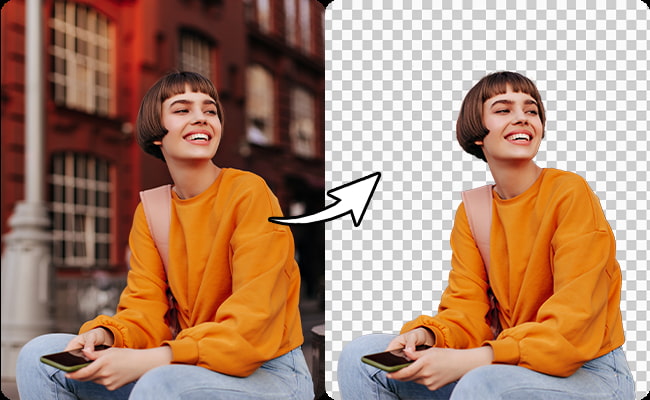
In today’s digital age, visuals play a crucial role in communication, marketing, and personal projects. One of the essential skills for anyone working with images is the ability to remove backgrounds effectively. Whether you’re creating content for social media, developing a website, or designing marketing materials, a clean and precise image can make a significant difference. Fortunately, many free tools are available that allow you to remove image backgrounds without expensive software. This article will guide you through using a free image background remover to achieve professional results.
Why Use a Background Remover?
Enhancing Visual Appeal
Removing the background from an image can enhance its visual appeal, making it more versatile and focused. This is especially useful for product photography, where a clean background can make the product stand out.
Versatility in Design
A background-free image can be easily placed over different backgrounds, allowing for more creative and adaptable design options. This versatility is invaluable for creating cohesive branding across various platforms.
Focus on the Subject
Removing distractions from the background helps to keep the viewer’s focus on the main subject of the image. This is particularly important in professional presentations, marketing materials, and profile pictures.
Also Read: Software Releases That Might Be Buggy What You Need to Know
Choosing the Right Free Background Remover
Online Tools vs. Software
There are two main types of free background removers: online tools and downloadable software. Online tools are convenient as they don’t require installation and can be accessed from any device with an internet connection. On the other hand, downloadable software may offer more advanced features and offline access.
Key Features to Look For
When selecting a free background remover, consider the following features:
- Ease of Use: The tool should have an intuitive interface that makes the process straightforward.
- Precision: Look for tools that offer precise background removal, allowing you to refine edges and details.
- Speed: Fast processing times are essential, especially if you’re working on multiple images.
- Output Quality: The tool should maintain the quality of the original image after background removal.
- Additional Editing Tools: Some background removers offer additional editing tools, such as cropping, resizing, and color adjustments.
Step-by-Step Guide to Using a Free Image Background Remover
Step 1: Choose Your Tool
Select a free background remover that suits your needs. Some popular options include:
- Remove.bg: A user-friendly online tool known for its precision and quick processing.
- Canva: Offers a background remover feature along with a suite of design tools.
- PhotoScissors: An online tool that allows for manual and automatic background removal.
- GIMP: A free software that provides advanced editing capabilities, including background removal.
Step 2: Upload Your Image
Once you’ve chosen a tool, upload the image you want to edit. Most tools allow you to drag and drop the image file or select it from your device.
Step 3: Remove the Background
Use the tool’s background removal feature to separate the subject from the background. This process may vary depending on the tool:
- Automatic Removal: Tools like Remove.bg automatically detect and remove the background. You may need to fine-tune the edges for a cleaner result.
- Manual Removal: In tools like GIMP, you can manually select the background and remove it using selection tools such as the lasso, magic wand, or pen tool.
Step 4: Refine the Edges
After removing the background, refine the edges to ensure a smooth transition. Many tools offer options to soften or sharpen edges and adjust transparency. This step is crucial for achieving a professional look, especially when working with complex subjects like hair or fur.
Step 5: Save and Download
Once you’re satisfied with the result, save your edited image. Most tools allow you to download the image in various formats, such as PNG (for transparency) or JPEG. Choose the format that best suits your needs.
Tips for Professional Results
Choose High-Quality Images
Start with high-resolution images for the best results. Low-quality images may result in pixelation and poor edge definition after background removal.
Pay Attention to Detail
Take your time refining the edges and ensuring no background remnants are left. A clean and precise outline can significantly impact the image’s overall professionalism.
Experiment with Backgrounds
After removing the background, experiment with different backgrounds to see how the subject interacts with various colors and textures. This can help you create visually appealing and contextually appropriate designs.
Keep It Consistent
If you’re working on a project that involves multiple images, maintain consistency in the style and quality of background removal. This helps create a cohesive look across your project.
FAQs
What are the best free tools for removing image backgrounds?
Some of the best free tools include Remove.bg, Canva, PhotoScissors, and GIMP. Each offers unique features, so choose the one that best suits your needs.
Can I remove backgrounds from multiple images at once?
Some tools, like Remove.bg, offer batch processing features that allow you to remove backgrounds from multiple images simultaneously.
How can I achieve a professional look when removing backgrounds?
Start with high-quality images, pay attention to detail when refining edges, and experiment with different backgrounds to create a polished final product.
Is it possible to remove backgrounds from complex images?
Yes, it is possible, but it may require more effort and fine-tuning. Tools with advanced features, like GIMP, offer more control over complex images.
Conclusion
Using a free image background remover is a valuable skill for anyone working with digital images. Whether you’re a professional designer or a hobbyist, knowing how to effectively remove backgrounds can elevate the quality of your work. By choosing the right tool and following the steps outlined in this article, you can achieve professional results without spending a dime. Remember to pay attention to detail, experiment with different options, and always strive for the best possible quality.